ENCY Hyper Is Now in Your Browser. Here’s What’s New.
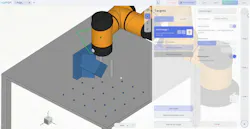
You can now explore Hyper without installing software. The latest updates also give you more ways to teach robot paths, fine-tune polishing operations, and work with equipment on the shop floor. ENCY Hyper is a visual programming platform for industrial robots. Engineers and operators can design a robot cell, build and test its program in simulation, then connect to the physical robot to run and refine that same program on the shop floor. The browser version gives you a hands-on introduction to that workspace.
Teach the path where the work happens
For some jobs, the easiest place to define a path is on the part itself. When programming a weld, an adhesive bead, or a polishing pass, you can capture the robot’s actual position. Use the teach pendant or guide the arm by hand if the robot supports it, adding waypoints as you move along the joint or contour.
For a longer seam, select Record Path and trace the joint. Hyper records a point each time the tool travels a set distance, so you can guide it in one continuous motion.
A connected 3D pointer lets you capture individual points or stream coordinates directly from the part without moving the robot. You can also save a set of points and reuse it in another command. For example, if an adhesive bead follows the same route as a weld, there’s no need to teach it twice.
A connected 3D pointer lets you capture individual points or stream coordinates directly from the part without moving the robot. You can also save a set of points and reuse it in another command. For example, if an adhesive bead follows the same route as a weld, there’s no need to teach it twice.
Fine-tune the polishing process
Once you’ve taught the path, you can change how the tool works the surface. The dedicated Polishing command lets you adjust tool angle, contact settings, polishing width, and pass count. Switch between zigzag and circular patterns or add another pass without retracing the part.
The Hyper programming guide shows how welding, adhesive dispensing, and polishing commands fit into a robot program.
Smoother control, easier navigation
An updated ESTUN driver delivers smoother motion when you jog the robot from Hyper’s pendant interface. The team tested the changes on a physical robot.
In the 3D view, zoom centers on the point under your cursor, and the camera stops as soon as you stop moving it. That makes it easier to go from a full-cell view to the detail you want to inspect. Other updates include a single window header, a Home button, a simpler way to start a project, and revised display defaults.
Try Hyper in Your Browser →